

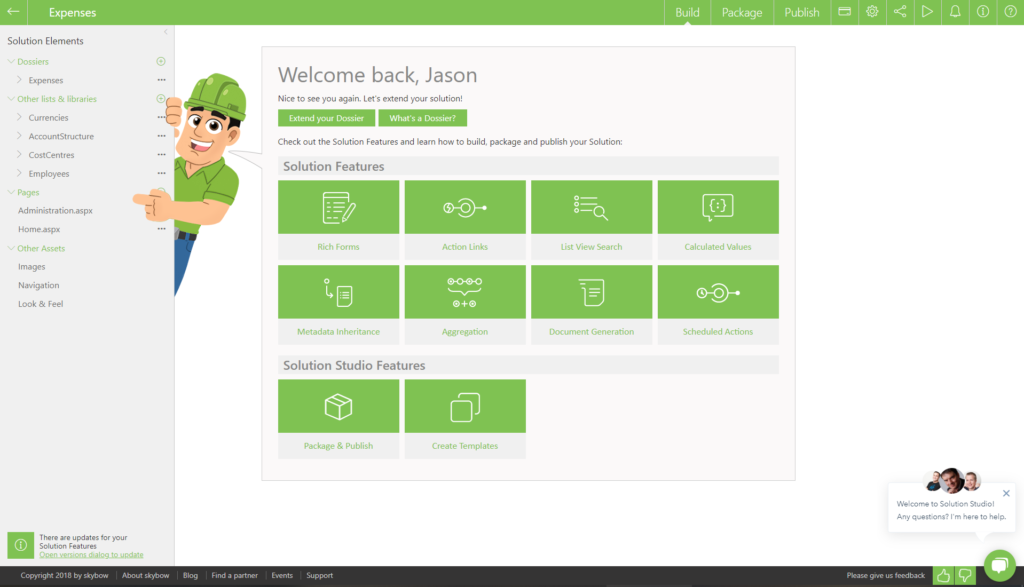
Special features of skybow

Rich Forms
Rich Forms is an integral part of skybow Solution Studio and provides a user-friendly yet powerful editor for customizing list forms. Creating forms in SharePoint Online that look great and fulfill all your form requirements has never been easier! Key Features: - Easy to deploy - Free placement of form fields - Can be grouped vertically, horizontally or in tabs - Edit sub-elements in a grid - Cascading lookups - Design forms separated by content type - Handle complex business logic

Action Links
With Action Links, you can easily manage even the most complex business logic in SharePoint Online with powerful actions. Key Featues: - Serial execution of multiple actions - Definable execution condition for each action - Define dynamic visibility - Drag & drop function to reorder action links - Multiple action types: - Add, update and delete list item - Send mail - Start workflow - Show messages to

Scheduled & Triggered Actions
Configure scheduled actions like a rule to automate executions. Choose from a range of powerful action types. Key features: - Execute actions hourly, daily, weekly, monthly or yearly (e.g. set email reminders or update items on a specific date) - Define dynamic filters to find items to act on - Execute (multiple) actions when items or documents are added or updated in SharePoint (e.g. send email notifications when a task is completed) - Define the trigger for when a task is completed (e.g. send email notifications when a task is completed)Define the trigger for actions such as 'Add', 'Update' or both - Define the execution condition for each action (e.g. check if a field has been changed) - Execute multiple actions in series - Define the execution condition for each action

Generation of documents
Generate documents based on standard Microsoft Word files populated with SharePoint list data with just one click. Key features: - Print your content suitably formatted - Loop functionality for (sub)list - Create an inventory of a complete list - Based on a standard MS Word file - Use powerful placeholders to insert SharePoint list data - The final document can be downloaded or saved directly to a SharePoint library

Transfer of metadata
Optimize the search result and refinement capabilities of SharePoint by inheriting metadata to related documents and items from your parent item. Key Features: - Use in a dossier (master-detail relationship) - Configurable on standard columns of a detail list - Retrieve values from the column of a related master list item - Use transferred data to improve search results - Automatic recalculation on changes in the master list - Asynchronous background calculation

Data aggregation
Define multiple aggregation types (summaries, averages, maximums and minimums, counts) in multiple lists and fields in a master-detail type of relationship. The data is physically stored in SharePoint lists and can be used as part of another calculation process. Key features: - Use in a dossier (master-detail relationship) - Configurable for standard columns of a master list - Calculate the sum, count, min, max or average of a column in a detail list - Use an optional filter (e.g. only open tasks) - Automatic recalculation on changes in the detail list - Asynchronous background calculation
How innobit supports you with skybow
Your contact person

Get in touch directly with Daniel Griener, Lead Delivery
+41 61 695 98 11
We look forward to your call!