


Register now for the 14th Basel Technology Apéro on October 24!

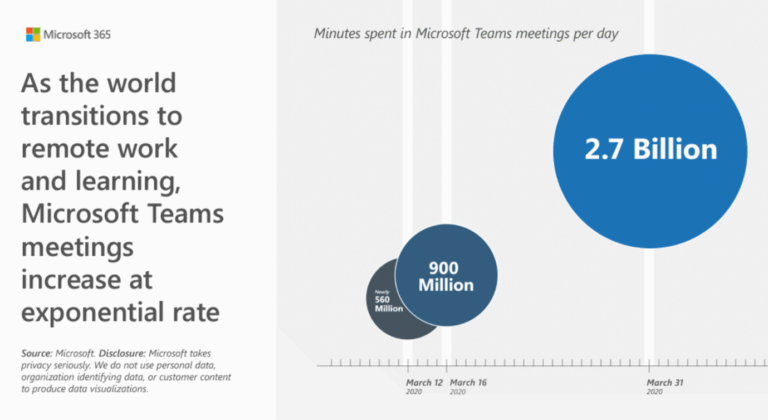
How many minutes of Teams Online meetings take place worldwide per day?

The following chart shows the value of 2.7 billion minutes per day at the end of March 2020, but it is certainly significantly higher now.

Minutes-in-Microsoft-Team-Meeting - innobit ag
Minutes-in-Microsoft-Teams-Meeting

Who has never attended a Teams Meeting? Hardly anyone, not even their own children. Teams meetings are taking place more and more, both in small and large groups.

Wouldn't it be nice to see in a simple report who actually attended the meeting?

Yes, the option is available! The meeting organizer can easily obtain such a report:
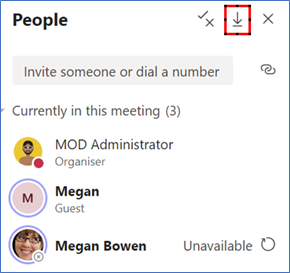


Participants-Microsoft-Teams-Meeting


However, a few things must be taken into account.

Here is also the official documentation from Microsoft on the subject of "Meeting Attendance Report Download".

  • The export file is in CSV format and can therefore be opened with Excel, for example
  • The Report includes
    • Name of the participant (Full Name)
    • Action (User Action: Joined, Left)
    • Date and time (timestamp)

IMPORTANT: 

  • The report can now be obtained from Meeting Owner AND must be downloaded during the session. 
  • As soon as the session is left by the owner, the report is no longer available (no joke!)

Here is a sample of such a report prepared in Excel:

Sample Report Microsoft Teams - innobit ag

For the functionality to be available, it must be activated by the Teams administrator via Powershell.

This function is not activated by default.

Continue to have fun and efficient, productive Microsoft Teams meetings.

Map - innobit ag