


Cloud - what does that actually mean?
Until the 00s, company-owned servers were standard. This entailed considerable effort, as the hardware had to be located on site and a team was often hired to look after and maintain the servers. Updates were often a major expense and were only carried out as required. This often led to blocks that took up a lot of everyone's time and nerves, and people were generally happy when the update phase was over and everything was working reasonably smoothly.
With the introduction of cloud services such as Office 365 or Azure, this effort has been reduced as providers now manage the servers centrally. Updates are carried out in smaller packages and also at shorter intervals, which ensures that all systems are always up to date. While this can have a major impact on the tasks in IT departments, essentially nothing changes for the user (except that the design and functions can be changed or expanded more frequently).

Before you switch to the cloud: what you should consider
Not every cloud provider is the same. As we all know, the devil is in the detail. To make the right decision regarding your cloud costs, you should ask yourself the following questions and review them internally.
- How large is the storage capacity?
- How many Office 365 licenses are included in a package and how many do I really need? (Please note: how many employees have their own digital workplace? This may differ from your total number of employees. Also important: not every employee needs the same amount of access and licenses).
- How flexibly can I expand or reduce my Office 365 plan if necessary?
- How flexible are the terms?
- Do I have a direct contact person for support or is there only general customer management?
- What requirements do I have for the location of the cloud data center? (Many providers operate different locations. There are often differences in costs depending on the country, but also differences in standards, e.g. in terms of data protection)
As you can see, there is a lot to consider in advance and I have only considered the basic topic of costs. Extended security, governance and technical components are also included in this preliminary round.
The problem: Why you don't have your cloud costs under control
If you are already in the cloud, you will have factored the above considerations into your decision. Or have you not? Don't worry, you can still optimize your cloud usage and probably save some money.
The main adjusting screw is called: Licenses!
Many companies buy cloud packages without even a rough plan. A rough estimate is made as to whether the number of licenses roughly matches the number of employees and something is added for good measure. The result: a disorderly mixture of too many and unsuitable licenses.
If you take a closer look at your environment, you will quickly notice: there are unused licenses that have never been activated; licenses from former employees that have not been redistributed; or even assigned admin licenses for users who don't actually need them.
So how do you ensure that you a) have the right licenses available and b) replace incorrectly allocated licenses? The checklist in the next chapter will give you the necessary pointers.
Checklist: How to get the most out of your cloud
This is what you need to carry out this check:
- Someone from IT who has access to the cloud admin center/backend
- The following checklist:
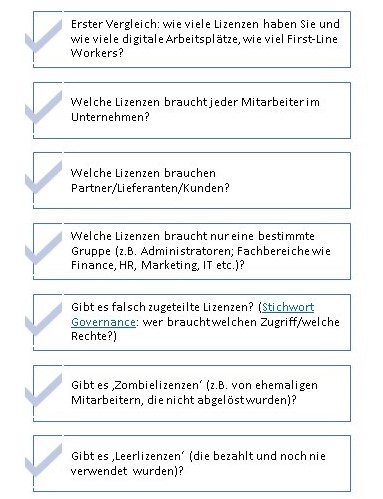
Go through these points and create an overview for each employee. This will quickly show you which licenses you can reallocate or reassign. In all likelihood, you will also come to the conclusion during this process that the current licenses do not meet your needs and so you can react in a targeted manner.
By the way: the keyword licenses is not just about cloud access. Are you already making full use of your Microsoft licenses?
Cloud Analysis 4.0 - automated health check for your environment
Back to the topic. Cloud costs. As a smaller company, you can go through the above checklist and manually check all licenses. But if you have to analyze hundreds of employees individually, it will be a tedious, expensive and certainly frustrating endeavor. You may have wondered why an IT company's blog suggests a manual checklist.
Touché! But even we are nostalgic from time to time.
Of course, nowadays there are also automatic analysis tools that shed light on the darkness in no time at all. After all, the real work for you should not be digging through your licenses, but thoroughly cleaning them up and thus optimizing the use of your cloud. Yes, there is also spring cleaning in IT.
We at innobit have expanded the process even further, because data alone is of little use if you don't derive any benefit from it. In our Health Check, we therefore combine man and machine - the automatically generated data from your environment is analyzed, interpreted and translated into applicable action points in close collaboration.
In addition to license utilization, a health check of your environment also analyses possible security gaps and indicates which areas you should urgently address to ensure smooth operation.
Are you interested but still unsure? Then send us an email with your questions or fill in the form below to receive a free, no-obligation sample report.