


Monday morning: My inbox is full of excited emails from a customer who is confused. A software update from the cloud provider has introduced new features and changed functionalities in the interface. Although these were announced, they were not given any further attention internally and were quickly forgotten. The 'suddenness' of the new display and functions was purely due to a lack of internal communication and cost a few hours that could easily have been spent on more important tasks.

In general, the strategic switch to the cloud hides a number of pitfalls that companies often encounter unexpectedly. For example, the short lifecycles of cloud applications and the associated operational risks are often not in the awareness of those responsible or managers. Confusion and a lack of understanding, as in my example, are the easiest consequences; if updates are not managed proactively, they can lead to delays in projects and even losses in working time and capital.
Where does the lack of awareness come from?
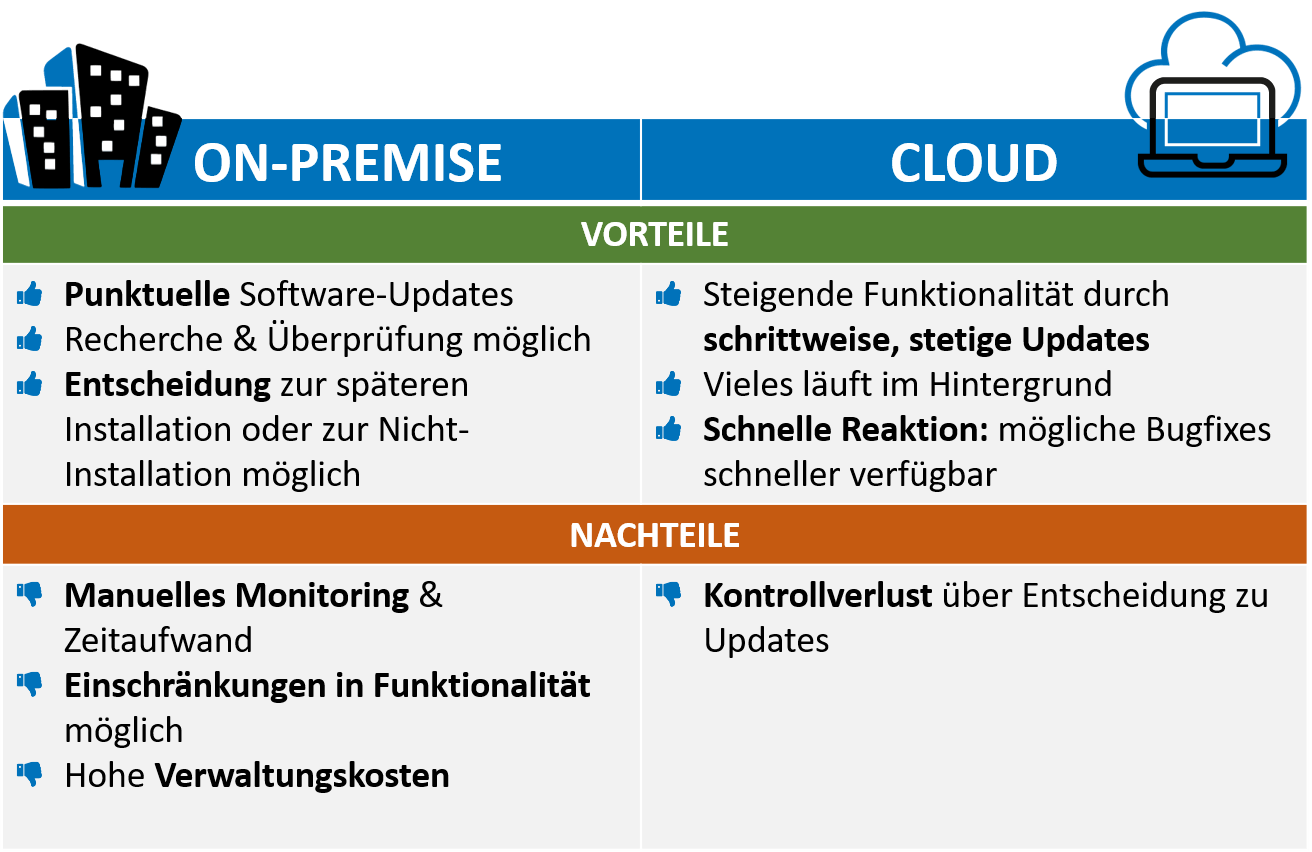
A brief digression into software history: on-premise solutions (i.e. those that are stored on internal or external servers) contain permanently installed software components. Until a few years ago, it was therefore common practice to carry out software updates in a bundle at a time that was convenient for the company.
Example: Office 2003 is used by all employees at SoftwareHelden. The 2007 update is met with widespread skepticism, as some new features may not be compatible with an internal tool. The company waited and examined the update before finally deciding not to install it in 2008. The 2010 update, on the other hand, is largely found to be suitable and error-free and so, a few months after its release, all SoftwareHelden computers are running Office 2010.
The procedure is completely different in the cloud. The analysis, evaluation and approval of whether a software update can be carried out, for example, is largely eliminated in the cloud. This means that software updates for business-critical cloud applications such as email, office suites or third-party apps are generally classified as "unmanaged" from the company's perspective. This is because updates are simply installed in the cloud. This often happens at short intervals and without the customer being able to exert any influence.
Example: Our friends at SoftwareHelden have now upgraded to Office 365 in order to use more flexible, efficient and diverse ways of working. They are also happy about the various functionalities included in the package. One day, however, Urs Müller notices that his personal overview suddenly shows not only his projects and teams, but also a second tab with all teams. Urs is confused, as he has not made any requests for changes. After a short search, he finds out that this is not an individual change, but a general update. And he is amazed: since the switch to the Office Suite, a long list of updates has already been installed that he hadn't even noticed before!
What to do?
It is fundamentally important to keep an eye on innovations and inform affected teams so that plans and workflows can be adapted promptly. It is not only the fast pace of software that has an impact, but also the increasing complexity of tools and their interaction in the digital workplace. Cloud solutions offer a variety of benefits that require proactive management of services. Every provider publishes a roadmap for updates, such as Microsoft for Office 365.
Of course, you may not have the capacity to monitor the 443 updates that are currently planned for this part of your digital workplace alone in 2019. innobit therefore offers proactive change management for cloud services. You can find more information here.
Do you have a general question about the digital workplace, applications or the development of IT in your company? Book a free breakthrough session with our experts at innobit in Basel or conveniently at your office. We look forward to hearing from you!