Register now for the 14th Basel Technology Apéro on October 24!
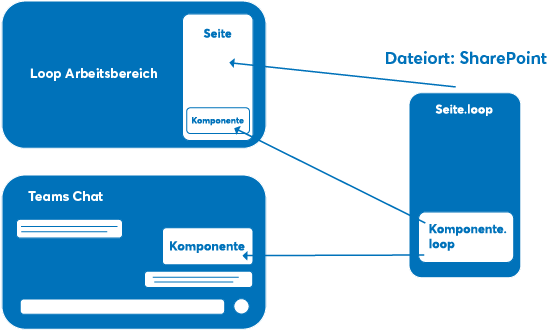
Microsoft Loop is a collaboration platform from Microsoft that has been available as a public preview since March 2023. The Loop application is designed to enable users to work together collaboratively in workspaces and on websites. This is made possible by the Loop components in real time and across applications.
In June 2023, Microsoft Loop is in the public preview phase. This means that the application and some of its functions can already be used by business and private users, although the platform is still under development.
Existing functions (preview)
Available in the public preview of Microsoft Loop:
- Teams
- Outlook
- Word (web version)
Microsoft Loop - Setup in the organization
During the preview phase of Microsoft Loop (as of June 2023), anyone with a license for Exchange Online can use the platform and its functions.
Loop features can be enabled across the organization and by implementing Microsoft Loop you can improve collaboration and efficiency in your business.
This white paper explains the necessary steps, best practices and tips for a successful implementation.
Microsoft Loop offers a flexible and collaborative environment for specific use cases in companies. When deciding whether to use Microsoft Loop or another Microsoft 365 product, the specific requirements and functional scope of the respective tools must be taken into account.
In principle, Loop should be used for internal tasks where the focus is on flexible collaboration - "fast and creative", but effective collaboration.
Microsoft Teams offers the option of adding an agenda to a meeting as a loop component. Thanks to the possibility of real-time collaboration, changes and additions can be made by all participants.
This facilitates the management and visibility of the agenda. The integrated "Agenda" area of Teams Meetings shows participants where the agenda can be found.
Meeting participants can save their notes in a loop component and share them with others after the meeting.
Alternatively, Microsoft Teams with its function for creating and sharing documents can also be used.
Depending on the scope and layout of the notes, consider whether Microsoft Loop is the best option, as other products such as Microsoft OneNote may offer more specific features for capturing and organizing meeting notes.
Microsoft Loop offers a suitable environment for joint brainstorming. Participants can record their ideas in a shared document and discuss and develop them in real time.
In combination with Loop components, Microsoft Whiteboard can also be used to visually capture and discuss ideas. The Loop page serves as the primary point of contact and the function of sharing components across Microsoft 365 apps can enable integrations such as with Whiteboard.
In this use case, the asynchronous collaboration possible with Loop through real-time updates and comment functions in the components can in some cases replace and simplify the alternative workflow of a team meeting with joint editing of a OneNote.
Microsoft Loop offers a template for the joint creation and documentation of team decisions. The team can work together on a document and discuss various options and arguments.
The commenting functionality and tagging of employees enable an asynchronous way of working instead of or in combination with a meeting.
If you already have defined processes and tools in your company for planning and documenting projects, orders, etc., do not see Loop as a replacement for the complete system, but as a supplement in some suitable use cases.
You can identify these use cases by asking yourself the following questions:
The analysis has shown that Loop is suitable for use cases where a fast and dynamic collaborative solution is needed for taking notes or sharing information and opinions.
Although the components are therefore suitable for such use cases due to their real-time updating, classic Office products such as Word and PowerPoint should still be selected for saving results due to their far greater range of functions and lower dynamics.
In practice, the success of Microsoft Loop depends heavily on the individual implementation and customization that each company must undertake in order to use the product effectively. It is important that companies consider their specific requirements and workflows to ensure that Microsoft Loop actually adds value to their organization.
The following blog posts may also be of interest to you.
20.04.2023
Switzerland is getting a new law for better protection of personal data (nDSG). Companies will have to comply with the new rules in future and should adapt their existing policies and data protection declarations by the time it comes into force on September 1, 2023.
23.02.2023
Human conversation through artificial intelligence. ChatGPT is a technological revolution and can be put to good use in many industries. But do we have to worry about the future of the working world because of ChatGPT?